
Posts

What Is the Best TrueNAS Server in 2026?

Choosing the best TrueNAS server in 2026 depends less on a single “best” model and more on what you need it to do. A home photo archive has different demands from a small office running virtual machines or shared editing projects. The right True Nas Server should balance storage capacity, memory, processor performance, network speed, noise, and long-term operating costs.

A quiet four-bay system may suit a home with several terabytes of photos and backups. A business handling large media files may benefit more from faster networking and room to expand. Drive bays matter, but so do memory capacity and upgrade options. ECC memory can help detect certain data errors, though it does not replace good backups. That distinction matters. Fast disks cannot recover a file that was never backed up.

This guide compares server types and key hardware choices, including compact systems, tower builds, and rack-mounted options. It also considers power use, cooling, storage growth, and the practical work of maintaining a server. Specifications can look convincing on a product page, yet real workloads may expose limits in airflow, expansion, or noise. There is no perfect checklist, and some trade-offs are easy to underestimate. The recommendations aim to explain who each option serves, what to verify before buying, and where a less expensive system may be enough.
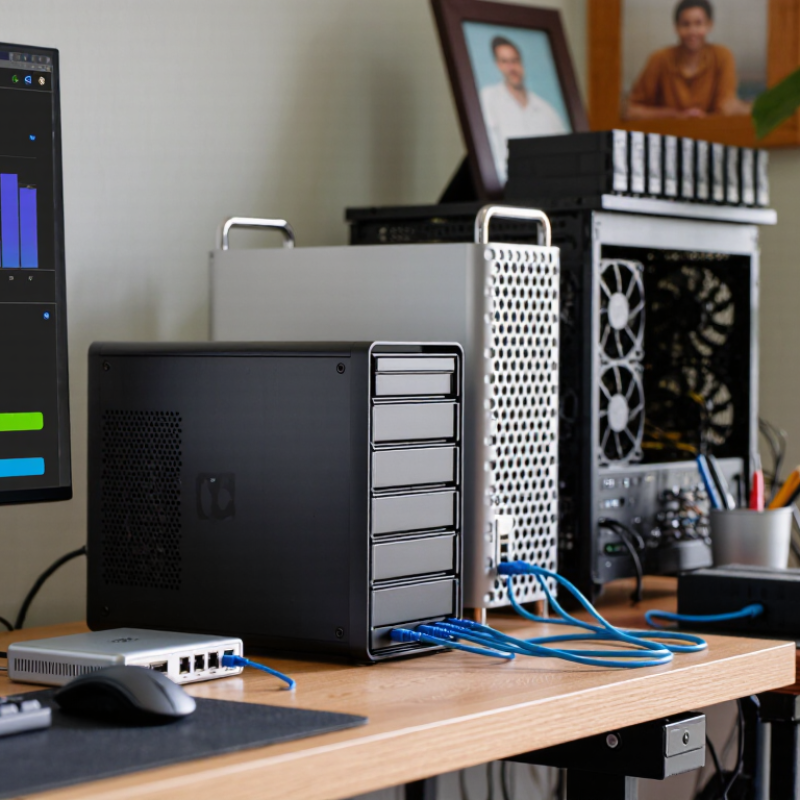
What Is the Best TrueNAS Server in 2026?

What “Best TrueNAS Server” Means for Different Workloads in 2026

The best storage server in 2026 depends on what it must do. IDC’s 2022 Global DataSphere forecast estimated that 221 zettabytes of data would be created, captured, or replicated worldwide in 2026. That does not mean every home or studio needs vast capacity. A family archive of photos needs quiet, economical disks and a separate backup. A video team needs fast network links and enough throughput to scrub large files without delays. Small offices differ.

Virtual machines and databases need responsive storage, ample memory, and reliable low-latency connections. For those workloads, solid-state drives may matter more than raw disk capacity. Bulk archives benefit from hard drives, while separate backups help protect against accidental deletion or hardware failure.

IDC’s 2020 Rethink Data study found that organizations used only about 32% of available data. More storage alone will not fix poor access or unclear retention habits. Sometimes, less is better.

A useful specification starts with peak concurrent users, usable capacity after redundancy, and the network speed available at the desks. These are estimates, not guarantees; real performance changes with file sizes, workload mix, and configuration.

One detail is easy to miss: redundancy is not a backup. Keep an independent copy, and test restoring a few files before trusting the setup.

How Storage Capacity, Redundancy, and Network Speed Shape Requirements

A capable TrueNAS server in 2026 starts with the data, not the processor.

IDC’s 2022 Global DataSphere forecast projected 221 zettabytes of data created and replicated worldwide in 2026. That scale is not a home-server shopping list, but it shows why capacity planning matters. Estimate usable space after redundancy, then leave room for snapshots, growth, and rebuilds. A pool that looks roomy on day one can feel cramped a year later.

Keep some headroom.

Redundancy should match the cost of losing files and the time available for recovery. Uptime Institute’s 2024 outage analysis found that 54% of respondents said their most serious recent outage cost more than $100,000. A small office may face different stakes, but a second copy still matters; redundancy is not a backup.

For network speed, measure real workloads: several users editing large files need more throughput than one person streaming media. A 10-gigabit link can help, but only if drives, switches, and client hardware can keep pace. Otherwise, it is expensive headroom.

I would test with actual file transfers before buying faster networking; benchmark numbers can flatter an idle system.

The best-fit server balances usable capacity, fault tolerance, and measured network demand—not the biggest specification sheet.

Which CPU, Memory, and Drive Options Suit TrueNAS Systems

A good TrueNAS server starts with a workload, not a processor with the highest core count. For file sharing, backups, and a few lightweight services, a modern 4- to 8-core CPU is often sufficient. Heavier encryption, virtual machines, or media conversion can benefit from more cores. Keep some headroom for background checks; they can make a busy system feel sluggish. Fast cores are not everything.

Memory matters because ZFS uses RAM to cache frequently accessed data. For a small home system, 16 GB may be workable, while 32 GB gives more room for services and larger storage pools. Choose error-correcting memory when the platform supports it, and verify compatibility before buying. More RAM is useful, but it cannot repair a poor drive layout. That part is easy to underestimate.

Use matching-capacity hard drives for bulk storage, and plan redundancy around the loss of a drive, not just the purchase price. A mirrored pair offers straightforward expansion; wider parity layouts can use capacity more efficiently, with different rebuild and failure trade-offs. Keep the operating system on a separate boot device, and avoid treating it as a data backup. SSDs can help with latency-sensitive workloads, but cache devices are not automatic upgrades. Measure your actual use first. A quiet, well-cooled case and a reliable power supply matter too; drive temperatures and vibration are easy details to overlook.

How to Compare DIY Builds, Workstations, and Enterprise Servers

A DIY TrueNAS build suits hands-on owners who can test components, replace failed disks, and tolerate occasional troubleshooting. A quiet tower with ECC memory and several drive bays can be excellent for home media and backups. But low purchase cost does not include your hours. I would compare total cost over five years, including drives, power, and replacement parts. IDC’s 2018 Data Age 2025 forecast projected 175 zettabytes of global data by 2025; that forecast is old, but it underscores why growth and expansion matter.

A workstation is a practical middle ground when you need predictable cooling, more memory, and room for additional storage. Check the exact motherboard’s drive connectivity and memory support; “workstation” alone guarantees little. Small details matter. A chassis that fits eight drives may still have awkward airflow or noisy fans. I have seen capacity look generous on paper, then disappear once redundancy and snapshots are planned.

Enterprise servers make more sense when downtime has a real business cost. They can offer redundant power supplies, hot-swap bays, and vendor support, but add noise, heat, and service expenses. Uptime Institute’s 2024 Annual Outage Analysis reported that 54% of respondents’ most recent significant outages cost more than $100,000. That is not a home-server estimate. Still, it helps frame the trade-off: pay for support when recovery time matters, not just for a larger chassis. A tested backup remains essential, whichever build you choose.

What Is the Best TrueNAS Server in 2026? - How to Compare DIY Builds, Workstations, and Enterprise Servers

Comparison Factor DIY Build Workstation Enterprise Server
Best suited for Home labs, media libraries, backups, and users comfortable selecting and assembling components. Small offices, creative teams, and users who need a ready-made tower with room for expansion. Organizations that need high availability, standardized support, and substantial storage capacity.
Typical form factor Mid-tower or compact tower; rack mounting depends on the selected case. Usually a tower; some workstation-class systems can be rack mounted with suitable hardware. Typically a rack server, commonly in 1U to 4U formats.
Processor and memory A current 64-bit x86 processor and memory sized for the workload. ECC memory is a useful option when supported by the processor and motherboard. Often offers more memory capacity and expansion than a basic desktop. ECC support varies by system configuration. Commonly supports large memory capacities, multiple processors on some models, and platform-level ECC memory.
Drive bays and capacity Flexible: the case and controller determine the number of internal drives. A build with 6–12 bays is a common expandable starting point. Usually offers fewer internal bays than a storage-focused rack server; additional drives may require expansion shelves or external enclosures. Often designed for many hot-swap drives. Configurations with 12, 24, or more bays are available, depending on chassis and drive size.
Storage controller Select a controller that gives the storage software direct access to disks. A compatible HBA in IT mode is a common approach. Check whether the built-in controller supports direct disk access; controller behavior can vary by configuration. Verify that the controller can expose individual disks directly. Hardware RAID abstraction can limit ZFS visibility and management.
Networking 1 GbE is adequate for many basic uses; 2.5 GbE or 10 GbE can improve transfers when the network and clients support it. Often includes at least one wired Ethernet port. Faster networking may require an add-in adapter. May offer multiple high-speed ports and expansion options. Actual throughput depends on the network, disks, workload, and configuration.
Redundancy and serviceability Depends on the parts chosen. Redundant power supplies and hot-swap drive access are possible, but not standard in every build. Generally easier to service than a basic desktop, but hot-swap bays and redundant power are configuration-dependent. Often designed for hot-swap drives, redundant power supplies, and remote management; confirm these features on the specific configuration.
Noise and power Can be tuned for lower noise and power use, though drive count and cooling requirements affect both. Usually suitable for an office or equipment room, but fan noise and power draw vary with workload and components. Typically best placed in a dedicated equipment room; high drive counts and server cooling can increase noise and power use.
Up-front cost Highly adjustable. Reusing compatible parts can reduce the initial outlay, while quality drives, memory, and a suitable case add cost. Usually higher than a basic DIY build, with cost influenced by memory, storage options, warranty, and expansion features. Usually the highest initial investment, especially with redundant components, support coverage, and large drive configurations.
Maintenance and support The owner is responsible for component compatibility, troubleshooting, and replacement parts. May include a manufacturer warranty, but storage expansion and long-term parts availability should be checked. May offer defined support and replacement procedures; support terms and response times depend on the purchase agreement.
Main trade-off Maximum flexibility, with more responsibility for design, testing, and ongoing maintenance. A balance of convenience and expandability, but storage capacity and redundancy may be limited by the chassis. Strong serviceability and expansion, balanced against higher cost, power use, and noise.
A practical choice when You want control over every component and can validate compatibility before deployment. You want a supported tower platform and do not need a high-density rack chassis. You need predictable service procedures, many drive bays, or enterprise support requirements.

Note: These are general platform characteristics, not guarantees for every system. Confirm processor architecture, memory support, drive-bay count, controller mode, network interfaces, power redundancy, and warranty details for the exact configuration. ECC memory is recommended where supported; the right memory capacity depends on the workload rather than a single universal ZFS rule.

How to Choose a TrueNAS Server for Your Budget and Growth Plans

The best storage server is not necessarily the largest one; it is the system that fits your workload today and has room to grow. Start by estimating usable capacity, not just the total drive space printed on a box. Redundancy and filesystem overhead reduce what you can actually store. Keep it simple. A household storing photos and computer backups may need fewer drive bays than a small team working with large video files.

Set a firm budget that includes more than the server itself. Drives, memory, network equipment, and a backup target can add up quickly. For data integrity, consider memory with error correction when the system supports it, and choose a processor suited to your file sharing and applications. A faster network helps only when your clients, cabling, and storage can keep pace. A quiet, low-power machine may be a better fit beside a desk than a loud system built for a rack.

Think about growth before filling every bay. An enclosure with spare slots or a clear expansion path can delay an expensive replacement, but buying far more capacity than you need also ties up money. Check drive compatibility, cooling, and service access before choosing; small details matter when replacing a failed disk. Plan separate backups as well. Redundancy helps a server stay online, but it does not protect against every kind of data loss. The right balance is rarely perfect, and your first capacity estimate may need revisiting after a few months of actual use.

Choosing a TrueNAS Server: Budget and Growth Profiles

Compare illustrative hardware planning targets for a compact setup, a balanced home or small-office server, and a system designed for expansion. More drive bays provide room to grow; additional memory can help support larger workloads and applications.

These are representative planning examples, not official minimums, vendor specifications, or performance benchmarks. Choose hardware based on your workload, storage needs, and expected expansion.